🚀 SAC for Boeing 747 Pitch Control
✨ What You'll Learn
This tutorial demonstrates how to evaluate a pretrained Soft Actor-Critic (SAC) agent for longitudinal pitch control of a Boeing 747 aircraft using the normalized ImprovedB747Env environment.
📋 Overview
The Soft Actor-Critic (SAC) algorithm is a state-of-the-art off-policy deep reinforcement learning method that excels at continuous control tasks. This example showcases:
- Pretrained Agent: Load a ready-to-use SAC policy from Hugging Face Hub
- Boeing 747 Dynamics: Realistic longitudinal flight dynamics model
- Normalized Environment: Actions and observations scaled to [-1, 1] for stable learning
- Real-time Visualization: Pygame-based rendering of aircraft response
🎯 Task Description
The agent controls the elevator deflection to track a sinusoidal pitch angle reference signal. The state includes:
| Variable | Description | Unit |
|---|---|---|
u |
Longitudinal velocity perturbation | m/s |
w |
Vertical velocity perturbation | m/s |
q |
Pitch rate | rad/s |
θ |
Pitch angle | rad |
🔧 Installation
Quick Install
Dependencies Breakdown
| Package | Purpose | Version |
|---|---|---|
tensoraerospace |
Core library with environments and agents | Latest |
pygame |
Real-time visualization | ≥2.0.0 |
torch |
Neural network backend for SAC | ≥1.9.0 |
💡 Display Required
Rendering uses Pygame and requires a graphical display. For headless servers, remove the env.render() call or use a virtual display (e.g., xvfb).
⚡ Quick Start
Command-Line Execution
Run the pretrained agent with default parameters (auto-detects GPU):
python example/reinforcement_learning/deep_rl/sac-b747-render.py \
    --render \
    --dt 0.1 \
    --tn 200 \
    --repo TensorAeroSpace/sac-b747
Or explicitly specify device:
python example/reinforcement_learning/deep_rl/sac-b747-render.py \
    --render \
    --dt 0.1 \
    --tn 200 \
    --repo TensorAeroSpace/sac-b747 \
    --device cuda  # Use GPU (or 'mps' for Apple Silicon, 'cpu' for CPU)
Command-Line Arguments
| Argument | Description | Default |
|---|---|---|
--render |
Enable real-time visualization | False |
--dt |
Simulation time step (seconds) | 0.1 |
--tn |
Number of time steps | 200 |
--repo |
Hugging Face Hub repository | TensorAeroSpace/sac-b747 |
--device |
Device for computation (cuda, mps, cpu) |
Auto-detects |
--seed |
Random seed for reproducibility | 42 |
📝 Complete Python Example
Step 1: Import Dependencies
import numpy as np
from tensoraerospace.agent.sac import SAC
from tensoraerospace.envs.b747 import ImprovedB747Env
from tensoraerospace.signals.standard import sinusoid_vertical_shift
from tensoraerospace.utils import generate_time_period, convert_tp_to_sec_tp
Step 2: Configure Simulation Parameters
# Simulation settings
dt = 0.1    # Time step in seconds (10 Hz update rate)
tn = 200    # Number of steps (20 seconds total)
Step 3: Generate Reference Signal
Create a smooth sinusoidal pitch angle reference with 1° amplitude:
# Generate time arrays
tp = generate_time_period(tn=tn, dt=dt)
tps = convert_tp_to_sec_tp(tp, dt=dt)

# Create reference signal: 1° sinusoid at 0.05 Hz
reference_signal = np.reshape(
    sinusoid_vertical_shift(
        tp=np.asarray(tps),
        frequency=0.05,          # Period of 20 seconds
        amplitude=np.deg2rad(1.0),  # Convert 1° to radians
        vertical_shift=0.0       # Centered around 0°
    ),
    (1, -1),  # Reshape to (1, tn)
)
📐 Signal Parameters
The reference signal has a period of 1/0.05 = 20 seconds, meaning the aircraft completes exactly one oscillation cycle during the episode.
Step 4: Initialize Environment
# Define initial state: [u, w, q, theta] - all zeros (trimmed flight)
initial_state = np.array([[0], [0], [0], [0]], dtype=np.float32)

# Create the improved B747 environment
env = ImprovedB747Env(
    initial_state=initial_state,
    reference_signal=reference_signal,
    number_time_steps=len(tp),
    dt=dt,
    initial_elevator_deg=0.0,
    use_initial_action_on_first_step=True,
)

# Synchronize model discretization with environment time step
env.unwrapped.model.discretisation_time = dt
Environment Configuration
| Parameter | Value | Description |
|---|---|---|
initial_state |
[0, 0, 0, 0] |
Trimmed flight condition |
dt |
0.1 |
Discrete time step |
initial_elevator_deg |
0.0 |
Neutral elevator position |
use_initial_action_on_first_step |
True |
Apply initial action immediately |
Step 5: Load Pretrained Agent
import torch

# Auto-detect device (CUDA/MPS/CPU)
device = torch.device("cuda" if torch.cuda.is_available() else
                     ("mps" if hasattr(torch.backends, "mps") and
                      torch.backends.mps.is_available() else "cpu"))
print(f"Using device: {device}")

# Download and load the pretrained SAC agent from Hugging Face Hub
agent = SAC.from_pretrained("TensorAeroSpace/sac-b747")

# Move agent to the selected device (if different from saved device)
if agent.device != device:
    print(f"Moving agent from {agent.device} to {device}")
    agent.device = device
    agent.critic = agent.critic.to(device)
    agent.critic_target = agent.critic_target.to(device)
    agent.policy = agent.policy.to(device)
    # Move log_alpha if it exists (for automatic entropy tuning)
    if hasattr(agent, "log_alpha") and agent.log_alpha is not None:
        agent.log_alpha = agent.log_alpha.to(device)
🤗 Hugging Face Integration
The model is automatically downloaded from the Hub on first use and cached locally. No manual download required!
🚀 GPU Support
The script automatically detects and uses GPU (CUDA/MPS) if available. You can also explicitly specify the device using the --device command-line argument. The agent will be automatically moved to the selected device after loading.
Step 6: Run Evaluation Loop
# Reset environment and get initial observation
obs, info = env.reset()
done = False
ret = 0.0  # Cumulative return

# Episode loop
while not done:
    # Get deterministic action from agent (no exploration)
    action = agent.select_action(obs, evaluate=True)

    # Step environment
    obs, reward, terminated, truncated, info = env.step(action)

    # Render visualization (comment out for headless mode)
    env.render(mode="human")

    # Check termination
    done = bool(terminated or truncated)
    ret += float(reward)

# Print final performance
print(f"Episode Return: {ret:.2f}")
Expected Output
🎯 Performance Interpretation
Higher returns indicate better tracking of the reference signal. A well-trained agent typically achieves returns above 1500 for this task.
📊 Understanding the Results
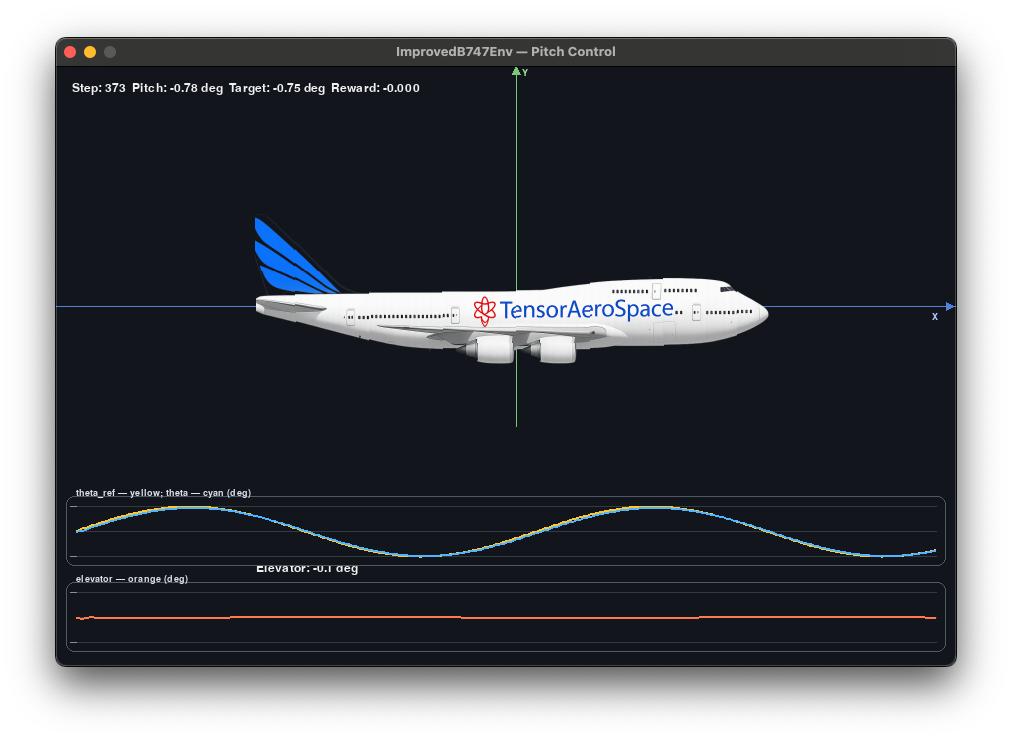
What to Observe
When running with env.render(), you'll see:
- Aircraft State: Real-time plots of velocity, pitch rate, and pitch angle
- Control Action: Elevator deflection over time
- Reference Tracking: How closely the pitch angle follows the sinusoid
- Reward Signal: Instantaneous reward at each time step
Performance Metrics
A successful agent demonstrates:
- ✅ Low Tracking Error: Pitch angle closely follows the reference
- ✅ Smooth Control: Elevator deflections without excessive oscillation
- ✅ Stable Dynamics: No divergence or instability
- ✅ High Cumulative Reward: Typically > 1500
🔍 Key Concepts
Normalization in ImprovedB747Env
⚠️ Important
All actions and observations are normalized to the range [-1, 1]. The environment handles scaling internally:
- Actions: Network outputs [-1, 1] → mapped to physical elevator limits
- Observations: Physical states → normalized to [-1, 1] for neural network input
SAC Algorithm Highlights
Soft Actor-Critic combines:
- Maximum Entropy RL: Encourages exploration through entropy regularization
- Off-Policy Learning: Sample efficient, learns from replay buffer
- Actor-Critic Architecture: Separate policy and value networks
- Automatic Temperature Tuning: Adaptive exploration-exploitation balance
Learn more: SAC Documentation
Time Synchronization
This line is critical to ensure the continuous-time dynamics model uses the same discretization as the environment's time step. Mismatch can cause:
- ❌ Simulation instability
- ❌ Poor agent performance
- ❌ Incorrect reward calculations
🛠️ Troubleshooting
Common Issues
ImportError: No module named 'pygame'
**Solution**: Install pygame for visualization support: For headless environments, remove the `env.render()` call.Model download fails or times out
**Solution**: Check your internet connection and Hugging Face Hub status. You can also manually download:Low performance / poor tracking
**Solution**: Ensure: 1. Model discretization matches `dt`: `env.unwrapped.model.discretisation_time = dt` 2. Reference signal amplitude is reasonable (1-5 degrees) 3. Using `evaluate=True` for deterministic actionsPygame display error on remote server
**Solution**: Use virtual display or remove rendering:GPU not being used / Model running on CPU
**Solution**: The script auto-detects GPU, but you can explicitly specify: The script will automatically move the loaded model to the specified device. Check the console output for device information:Segmentation fault or black screen
**Solution**: This usually indicates rendering issues on headless systems: 1. **Disable rendering**: Use `--no-render` flag 2. **Check DISPLAY**: Ensure `DISPLAY` environment variable is set for X11 3. **Use virtual display**: `xvfb-run -a python sac-b747-render.py` 4. **Verify GPU**: Ensure GPU drivers are properly installed if using CUDA The script now includes automatic GPU detection and device management to prevent these issues.📚 Related Examples
- F-16 Fighter Control with SAC
- SAC Algorithm Documentation
- Installation Guide
- Unity Environment Integration
🔗 Additional Resources
- 📦 Pretrained Model on Hugging Face
- 🏢 TensorAeroSpace Organization
- 📖 SAC Paper (Haarnoja et al., 2018)
- 🎓 Boeing 747 Model Documentation