PID Controller
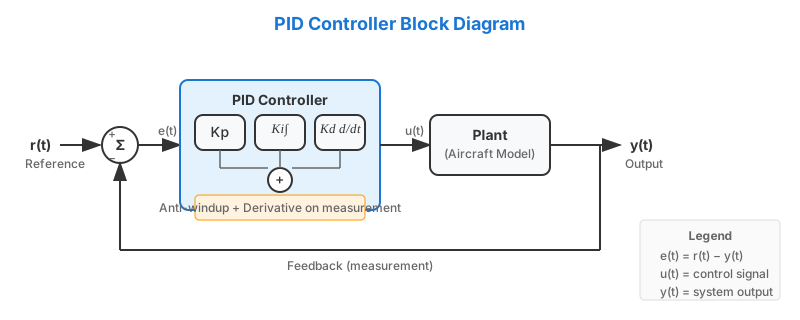
The PID (Proportional-Integral-Derivative) controller is a classic feedback control algorithm widely used in aerospace, robotics, and industrial automation. Our implementation follows MATLAB/Simulink conventions and includes automatic MATLAB-style coefficient tuning.
Theory
A PID controller computes the control signal \(u(t)\) based on the error \(e(t) = r(t) - y(t)\) between the reference \(r(t)\) and the measured output \(y(t)\):
Components
| Term | Role | Effect |
|---|---|---|
| Proportional (P) | Reacts to current error | Fast response, may cause steady-state error |
| Integral (I) | Accumulates past error | Eliminates steady-state error, can cause overshoot |
| Derivative (D) | Predicts future error | Dampens oscillations, sensitive to noise |
Discrete Implementation
In discrete time with step \(\Delta t\):
Derivative on Measurement
Our implementation uses derivative on measurement (not on error), as is default in Simulink. This avoids "derivative kick" when the setpoint changes suddenly.
Anti-Windup
When the control output saturates (hits actuator limits), the integral term can "wind up" causing large overshoot. Our implementation includes conditional integration anti-windup: the integral is frozen when output is saturated.
Quick Start
import gymnasium as gym
from tensoraerospace.agent.pid import PID

# Create environment
env = gym.make('LinearLongitudinalB747-v0', number_time_steps=2000)

# Create PID controller
pid = PID(env=env, kp=-0.1, ki=-0.01, kd=-0.05, dt=0.01)

# Control loop
obs, info = env.reset()
for _ in range(2000):
    reference = info['reference']
    measurement = obs[3]  # theta (pitch angle)
    action = pid.select_action(reference, measurement)
    obs, reward, done, truncated, info = env.step([action])
MATLAB-Style Automatic Tuning
The tune_matlab_style() method automatically finds optimal PID coefficients using global optimization, similar to MATLAB's PID Tuner in Simulink.
How It Works
- Extracts state-space model (A, B, C, D matrices) from the environment
- Determines loop sign automatically using DC gain analysis
- Runs differential evolution to minimize a cost function
- Optimizes for robustness: considers both step response AND tracking performance
Tuning Modes
Optimizes for clean step response with fast settling and minimal overshoot.
pid = PID(env=env)
result = pid.tune_matlab_style(
    track_state_idx=3,      # Index of theta state
    mode="step_response",
    target_settling_time=5.0,
    target_overshoot=10.0,
    n_iterations=100
)
print(result)
# MATLABTuneResult(Kp=-0.1234, Ki=-0.0456, Kd=-0.0789, ...)
Cost function minimizes: - Settling time (time to reach ±2% of final value) - Overshoot above target threshold - Steady-state error - Integral Squared Error (ISE) - Control effort and saturation
Also considers tracking performance as secondary objective (25% weight) to ensure the tuned PID doesn't fail on sinusoidal signals.
Optimizes for accurate following of time-varying signals (sinusoids, ramps).
pid = PID(env=env)
result = pid.tune_matlab_style(
    track_state_idx=3,
    mode="tracking",
    n_iterations=100
)
Cost function minimizes: - Root Mean Square Error (RMSE) - Integral Absolute Error (IAE) - Phase lag - Control effort and saturation
Also considers step response as secondary objective (25% weight) to ensure stability on sudden reference changes.
Usage Example with B747
import gymnasium as gym
import numpy as np
from tensoraerospace.agent.pid import PID
from tensoraerospace.signals.standard import unit_step
from tensoraerospace.utils import generate_time_period

# Setup
dt = 0.01
tp = generate_time_period(tn=20, dt=dt)
n_steps = len(tp)

# Create step reference signal (5 degrees)
reference = unit_step(degree=5, tp=tp, time_step=100, output_rad=False)

env = gym.make(
    'LinearLongitudinalB747-v0',
    number_time_steps=n_steps,
    initial_state=np.array([[0], [0], [0], [0]]),
    reference_signal=reference.reshape(1, -1),
    track_state='theta'
)

# Create and tune PID
pid = PID(env=env, dt=dt)
result = pid.tune_matlab_style(
    track_state_idx=3,        # theta index
    mode="step_response",
    target_settling_time=5.0,
    target_overshoot=10.0,
    n_iterations=150,
    verbose=True
)

print(f"Tuned PID: Kp={pid.kp:.4f}, Ki={pid.ki:.4f}, Kd={pid.kd:.4f}")
print(f"Settling time: {result.settling_time:.2f}s")
print(f"Overshoot: {result.overshoot:.1f}%")
Output Example
📊 MATLAB-Style PID Optimization (Step Response)
------------------------------------------------------------
   System dimension: 4 states
   Matrices: A=(4, 4), B=(4, 1), C=(4, 4), D=(4, 1)
   Simulation steps: 2000, dt: 0.01s
   Mode: Step Response
   Target settling time: 5.0s
   Target overshoot: 10.0%
   DC Gain: -0.0421

   🔄 Running optimization (150 iterations)...
   Optimization: 100%|██████████| 150/150 [00:45<00:00]

   ✅ Optimization completed!
   Kp=-0.1523, Ki=-0.0234, Kd=-0.0891
   [Primary step] Settling time: 4.32s
   [Primary step] Overshoot: 8.45%
   [Primary step] Static error: 0.0012
   [Secondary sine] RMSE: 0.3421
Key Parameters
| Parameter | Description | Default |
|---|---|---|
kp |
Proportional gain | 1.0 |
ki |
Integral gain | 1.0 |
kd |
Derivative gain | 0.5 |
dt |
Time step (seconds) | 0.01 |
env |
Gymnasium environment | None |
tune_matlab_style() Parameters
| Parameter | Description | Default |
|---|---|---|
track_state_idx |
Index of state to control | Required |
mode |
"step_response" or "tracking" |
"step_response" |
target_settling_time |
Desired settling time (s) | Auto |
target_overshoot |
Max acceptable overshoot (%) | 10.0 |
n_iterations |
Optimization iterations | 100 |
verbose |
Print progress | True |
Comparison with Other Methods
| Method | Pros | Cons | Best For |
|---|---|---|---|
| PID | Simple, fast, well-understood | Limited performance on complex dynamics | Linear systems, quick prototyping |
| MPC | Handles constraints, optimal | Computationally expensive | Constrained systems, trajectories |
| RL (SAC/PPO) | Adapts to nonlinear dynamics | Requires training, less interpretable | Complex nonlinear systems |
Practical Tips
When to Use PID vs Other Methods
- Use PID when the system is approximately linear and you need a simple, interpretable controller
- Use MPC when you have explicit constraints on states or controls
- Use RL when the dynamics are highly nonlinear or unknown
Unit Consistency
Ensure your reference signal and observations use the same units. Our tuner automatically handles degree/radian conversion for B747 environments.
Starting Point
For most aerospace systems, start with mode="step_response" and target_overshoot=10.0. This gives a good balance between speed and stability.
API Reference
PID(env=None, kp=1.0, ki=1.0, kd=0.5, dt=0.01)

Bases: BaseRLModel
PID controller implementation for control systems.
This class implements a PID (Proportional-Integral-Derivative) controller for automatic control systems. The PID controller uses proportional (P), integral (I), and derivative (D) components to compute the control signal.
Parameters:
| Name | Type | Description | Default |
|---|---|---|---|
env
|
Env | None
|
Gymnasium environment. Defaults to None. |
None
|
kp
|
float
|
Proportional gain. Defaults to 1. |
1.0
|
ki
|
float
|
Integral gain. Defaults to 1. |
1.0
|
kd
|
float
|
Derivative gain. Defaults to 0.5. |
0.5
|
dt
|
float
|
Time step (time difference between consecutive updates). Defaults to 0.01. |
0.01
|
Attributes:
| Name | Type | Description |
|---|---|---|
kp |
float
|
Proportional gain. |
ki |
float
|
Integral gain. |
kd |
float
|
Derivative gain. |
dt |
float
|
Time step. |
integral |
float
|
Accumulated integral value. |
prev_error |
float
|
Previous error value for derivative computation. |
env |
Gymnasium environment. |
Example
pid = PID(env=env, kp=0.1, ki=0.01, kd=0.05, dt=1) control_signal = pid.select_action(10, 7)
Initialize PID controller parameters.
select_action(setpoint, measurement)

Compute and return control signal based on setpoint and measurement.
This method uses the current measurement and setpoint to compute the error, then applies the PID algorithm to compute the control signal.
Parameters:
| Name | Type | Description | Default |
|---|---|---|---|
setpoint
|
float
|
Desired value that the system should reach. |
required |
measurement
|
float
|
Current measured value. |
required |
Returns:
| Name | Type | Description |
|---|---|---|
float |
float
|
Control signal computed by the PID controller. |
Example
pid = PID(env=env, kp=0.1, ki=0.01, kd=0.05, dt=1) control_signal = pid.select_action(10, 7) print(control_signal)
reset()

Reset PID controller internal state.
Resets integral accumulator and previous error to zero. Should be called before starting a new control episode.
tune_matlab_style(track_state_idx=0, target_settling_time=None, target_overshoot=10.0, n_iterations=100, verbose=True, mode='step_response', control_input_idx=0)

MATLAB-style PID tuning using state-space model optimization.
This method implements PID tuning similar to MATLAB Simulink PID Tuner. It requires the environment to have a model with state-space matrices (A, B, C, D).
Two optimization modes are available: - "step_response": Primary objective is step response (settling time, overshoot), with an additional secondary check on tracking (sinusoid) to avoid oscillatory controllers. - "tracking": Primary objective is tracking (RMSE), with an additional secondary check on step response to avoid controllers that behave poorly on setpoint steps.
Parameters:
| Name | Type | Description | Default |
|---|---|---|---|
track_state_idx
|
int
|
Index of the state to track (in output vector). Defaults to 0. |
0
|
target_settling_time
|
float
|
Target settling time in seconds. If None, uses 50% of simulation time. Only used in "step_response" mode. |
None
|
target_overshoot
|
float
|
Target maximum overshoot in percent. Defaults to 10.0. Only used in "step_response" mode. |
10.0
|
n_iterations
|
int
|
Number of optimization iterations. Defaults to 100. |
100
|
verbose
|
bool
|
Whether to print progress. Defaults to True. |
True
|
mode
|
str
|
Optimization mode. Options: - "step_response": Minimize settling time, overshoot, static error - "tracking": Minimize RMSE and phase lag for signal tracking Defaults to "step_response". |
'step_response'
|
control_input_idx
|
int
|
Index of the control input column of B used to compute the DC gain. For MIMO plants where the tracked output is not controlled by the first input, set this to the correct column. Defaults to 0 (backward compatible). |
0
|
Returns:
| Name | Type | Description |
|---|---|---|
MATLABTuneResult |
MATLABTuneResult
|
Optimized PID parameters and performance metrics. |
Raises:
| Type | Description |
|---|---|
StateSpaceNotAvailable
|
If environment does not have state-space matrices. |
ValueError
|
If environment is not set or invalid mode. |
get_param_env()

Get environment and agent parameters for saving.
Returns:
| Name | Type | Description |
|---|---|---|
dict |
Dict[str, Dict[str, Any]]
|
Dictionary with environment and agent policy parameters. |
save(path=None)

Save PID model to the specified directory.
If path is not specified, creates a directory with current date and time.
Parameters:
| Name | Type | Description | Default |
|---|---|---|---|
path
|
str
|
Path where the model will be saved. If None, creates a directory with current date and time. |
None
|
Returns:
| Name | Type | Description |
|---|---|---|
Path |
Path
|
Path to the directory with saved model. |
__load(path)
classmethod

Load PID model from the specified directory.
Parameters:
| Name | Type | Description | Default |
|---|---|---|---|
path
|
str or Path
|
Path to directory with saved model. |
required |
Returns:
| Name | Type | Description |
|---|---|---|
PID |
'PID'
|
Loaded PID model instance. |
Raises:
| Type | Description |
|---|---|
TheEnvironmentDoesNotMatch
|
If agent type does not match expected. |
from_pretrained(repo_name, access_token=None, version=None)
classmethod

Load pretrained model from local path or Hugging Face Hub.
Parameters:
| Name | Type | Description | Default |
|---|---|---|---|
repo_name
|
str
|
Repository name or local path to model. |
required |
access_token
|
str
|
Access token for Hugging Face Hub. |
None
|
version
|
str
|
Model version to load. |
None
|
Returns:
| Name | Type | Description |
|---|---|---|
PID |
'PID'
|
Loaded PID model instance. |
MATLABTuneResult(kp, ki, kd, settling_time, overshoot, ise, method='MATLAB-Style')
dataclass

Result of MATLAB-style PID tuning.
Attributes:
| Name | Type | Description |
|---|---|---|
kp |
float
|
Proportional gain. |
ki |
float
|
Integral gain. |
kd |
float
|
Derivative gain. |
settling_time |
float
|
Achieved settling time in seconds. |
overshoot |
float
|
Achieved overshoot in percent. |
ise |
float
|
Integral Squared Error. |
method |
str
|
Tuning method name. |
StateSpaceNotAvailable

Bases: Exception
Exception raised when state-space matrices are not available.
This exception is raised when trying to use MATLAB-style tuning methods on an environment that does not provide state-space matrices (A, B, C, D).